
Troubleshooting material adjustment issues
Learn how to diagnose and fix common issues with your material adjustments.
In this article:
- Why is my material adjustment showing a material cost of zero?
- Purchase Adjustments
- Manufacture Adjustments
- How do you find your material uncosted material adjustments?
- Why does my materials beginning inventory for all time show an amount?
- Why can't I add an inventory adjustment for this material?
Why is my material adjustment showing a material cost of zero?
All material adjustments must be costed for correct inventory valuations and COGS.
To find all zero-costed material adjustments, please take a look at this article: How do I find my uncosted material adjustments?
To troubleshoot, you'll need to find out which type of adjustment this is; you'll find this under the Reason column.
Purchase Adjustments
These are the easiest to repair as they usually indicate a data entry issue with the purchase that this material is linked to. For the example below, the purchase adjustment has a unit price of $0.00, which affects the following manufacture.
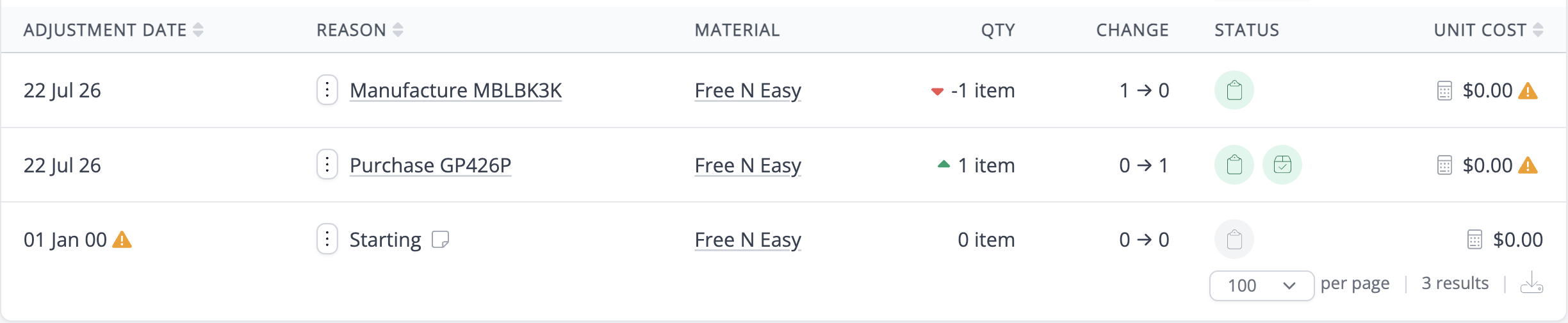
To fix, click on the edit icon on the left-hand side of the row, locate the material line item entry in the purchase, and fix any issues with the unit price.
Manufacture Adjustments
A manufacture adjustment with a zero unit cost can be a result of two situations:
-
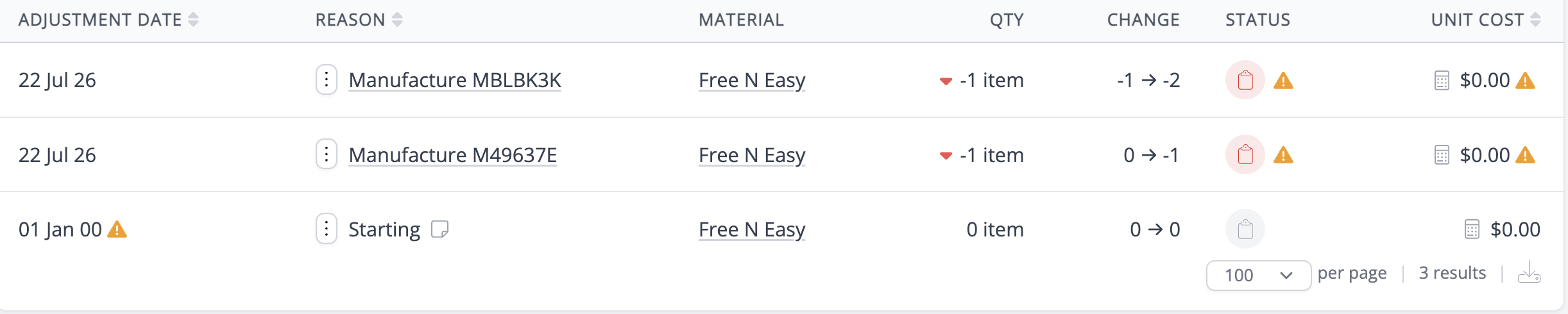
Error with a previous purchase price. In the example below, the purchase before the manufacture has a unit price of 0.00. This has resulted in the manufacture also having a unit price of 0.00 as it is using the zero-valued stock.
-
Material out of stock: In the example below, a previous manufacture used up all stock purchased. As there is now no stock available, the most recent Manufacture cannot have a unit cost calculated and is thus 0.00. To fix this, the missing material stock must be added as either a Purchase or part of the starting adjustment so that the most recent manufacture has enough stock to calculate the cost.
How do I find my uncosted material adjustments?
Uncosted material adjustments are those that have a calculated material cost of zero. To find your uncosted material adjustments:
-
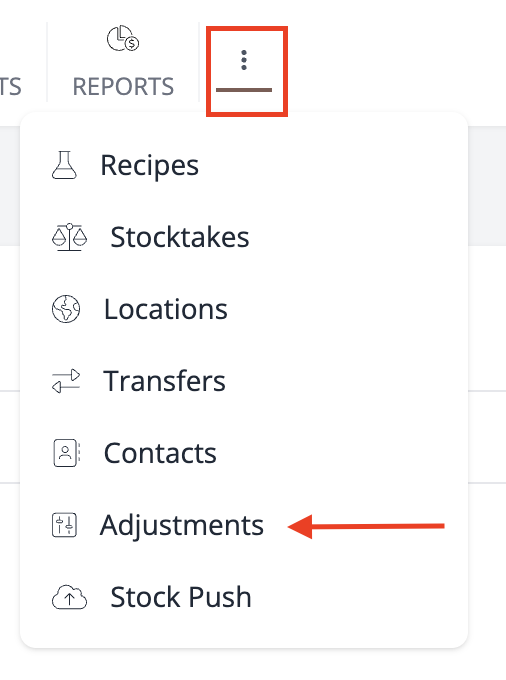
Navigate to your Material Adjustments page (How do I find my Material Adjustments page?)
-
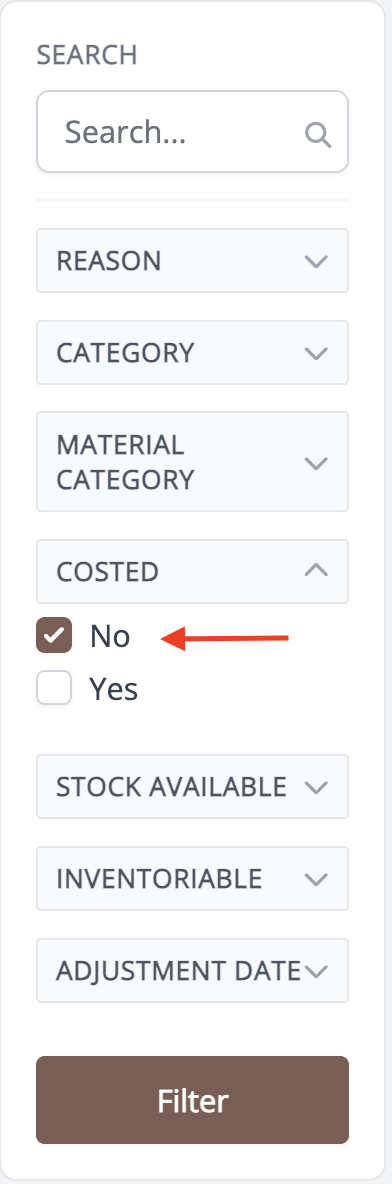
On the left-hand side, search the filter bar under Costed status and tick the 'Not Costed' box.
-
Click the Filter button. The page will refresh to show all adjustments with a material cost of zero.
To troubleshoot why your adjustment has a zero material cost, see this article: Why is my material adjustment costed as zero?
Why does my materials beginning inventory for all time show an amount?
If your material beginning inventory shows an all-time amount, it is usually due a starting inventory adjustment that is linked to one of your materials. This most likely was set when you first created your materials. As starting adjustments don't have a date associated with them (i.e., they are the stock you had on hand when "records began"), they are always assumed to be the starting amount and value no matter how far back in the date range you go.
If you want these adjustments to appear only within a specific date range, you'll need to find and set these starting adjustments to zero and then create a material purchase instead to account for the increase in stock with the correct date range.
To locate the starting adjustments you need to change, if you haven't yet added any manufactures or other manual adjustments, you may be able to look at your materials list page for materials where the value in the Purchased column is not the same as the In Stock one. This indicates that you have an inventory adjustment for this material.
For example, if your "Blue Ribbon" has a stock on hand of 30 but a Purchase of 20, this would mean that you most probably have a starting inventory adjustment of 10.
Why can't I add an inventory adjustment for this material?
This usually means the material is set as non-inventoriable. Non-inventoriable materials don't hold a stock quantity, so there's no Adjustments tab for them and no way to log an adjustment.
This commonly comes up when:
-
The Inventoriable checkbox was unticked by accident. If a material's stock count has disappeared, check whether "Yes, deplete stock when used in manufactures" is still ticked under Inventoriable on the material's edit form.
-
You're trying to re-tick Inventoriable on an existing material. The checkbox is locked once a material is created, so it can't be turned back on from the edit form.
Important: The Inventoriable setting can only be chosen when a material is first created. It can't be changed afterwards, in either direction.
To fix this, delete the material and re-add it with Inventoriable ticked, then re-enter its purchases and any other adjustments. See How do I delete a material? for the deletion steps.
See About inventoriable materials for the full explanation of inventoriable vs non-inventoriable materials.
Need Help?
Still having trouble with a material adjustment? Get in touch and we'll be happy to help.
Related articles:
- About inventoriable materials: inventoriable vs non-inventoriable materials
- About materials: the basics of setting up materials