
Exporting your recipes
Learn how to print a copy of a recipe or export all your recipes from the app.
You can print a copy of a single recipe or save a list of your recipes to your computer.
In this article, we'll cover:
Exporting your recipe list
To export your recipe list:
-
Click and choose Recipes in the main menu.
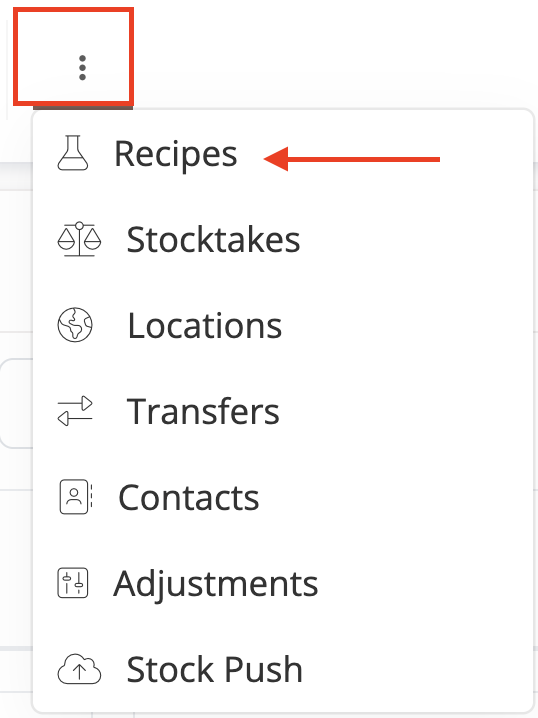
-
In the table pagination bar, click on the Export icon

- Save the .csv file to your computer or open the file with your preferred spreadsheet app.

Fields
| Recipe ID | An internal ID for the recipe. Repeats on every row so multi-row recipes stay identifiable if you resort the file. |
| Recipe Name | The name assigned to each recipe for tracking and reference purposes. |
| Product SKU | The SKU of the product associated with the recipe. Shows the variation's SKU instead when the recipe belongs to a specific variation. |
| Product Name | The name of the product. For reference only; not used when re-importing the file. |
| Variation Name | The name of the variation, if this recipe belongs to a specific variation. For reference only; not used when re-importing the file. |
| Batch Quantity | The number of units created when this recipe is used to produce a batch. |
| Manufacturing Minutes | The total time required to complete the manufacturing process for the batch. |
| Recipe Notes | Any notes added to the recipe |
| Material SKU | A list of all the material SKUs required to create the product according to the recipe. |
| Material Name | The name of the material. For reference only; not used when re-importing the file. |
| Material Quantity | The number of material units this recipe requires |
| Variation ID | The ID of the specific variation this recipe belongs to, if any. Re-importing this file uses this column to tell items apart when a Product SKU is shared by more than one item. |
| Project ID | The ID of the product or component this recipe belongs to. Re-importing this file uses this column the same way as Variation ID, when there's no variation to disambiguate. |
Keep the Recipe ID, Variation ID, and Project ID columns intact if you plan to re-import this file. They let the importer match rows to existing recipes and tell apart items that share a SKU. See Importing Recipes via CSV for more.
You can use this export as a template when updating or creating new recipes through our Bulk Recipe CSV Importer
Need more help?
If you're having trouble printing a recipe or exporting your recipe list, contact our support team for help.